Page 1 of 5
Re: Mug Printing problem - probably not the first!!!!
Posted: 19 Jan 2014, 09:57
by danno
Hi guys,
Well I've been getting through a lot of mugs in the last few days, most of them have gone in the bin, or used as pen holders (not for public viewing!!) and some have come out ok.....
....But, I can't seem to get consistent results, below are a couple of mugs with issues, I was thinking this is a heat problem, but I have taken on board on the great info on here and tried my hardest to change settings and pre-heat my mugs, but still not having a lot of luck.
So, what would your opinions be on the two mugs here, Here are my settings (which are from another thread on this website - thought I'd try it!): Idle temp 120c (248f) press temp: 190c (374f) I put the mug in on idle temp for 45 seconds, then wrap the image and cook for 140 seconds. I was doing 180c for 180 secs with an idle temp of 110c and a warm up of around 30 seconds on half the mug only, but my results weren't good.
Any help or opinions would be much appreciated!!
Number 1 has issues on the bottom only:
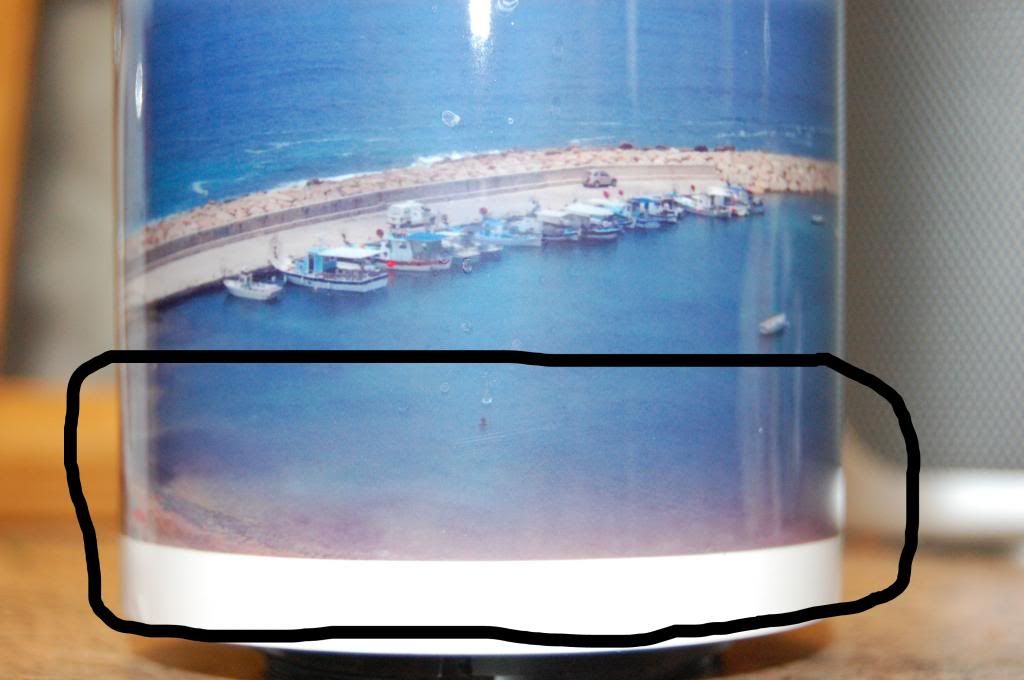
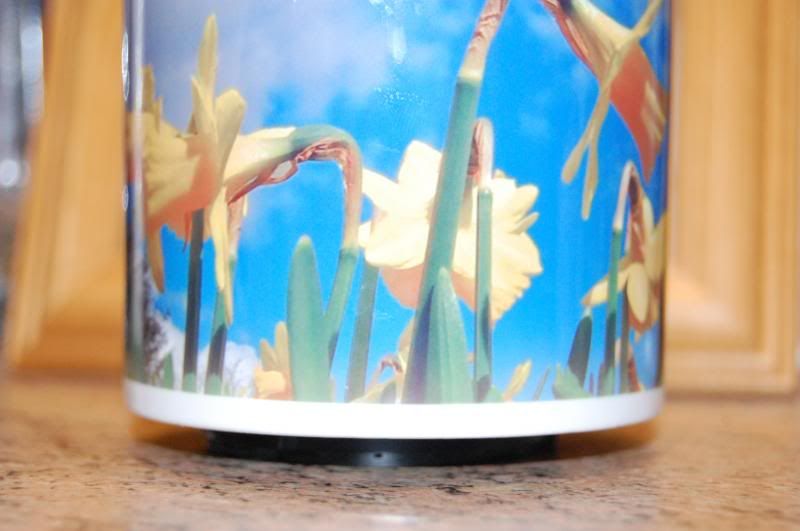
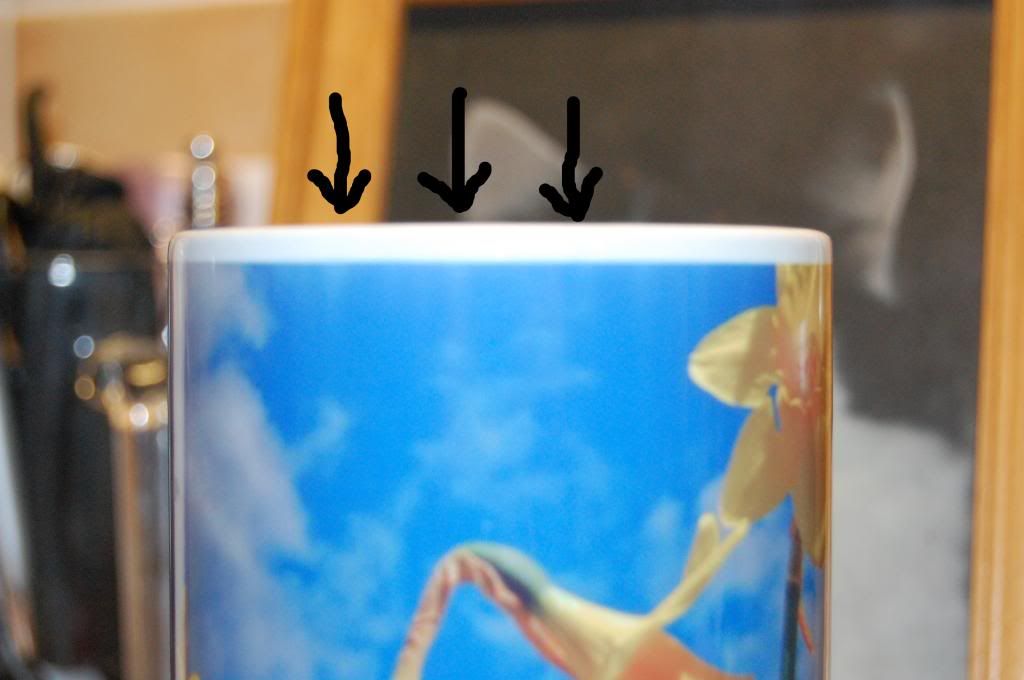
Number 2 has the same on the bottom, and also some vertical streak marks on the top....sorry for the photo quality, it's hard to see but in line with the arrows
Re: Mug Printing problem - probably not the first!!!!
Posted: 19 Jan 2014, 11:04
by Justin
What press and printer are you using? Also which mugs?
Re: Mug Printing problem - probably not the first!!!!
Posted: 19 Jan 2014, 11:19
by danno
Hi Justin,
The mugs are from Coralgraph, the press is a cheapo chinese model from monsterdoodle along with an epson Xp-215 from the same place! on the whole I'm getting good results,but it's very hit and miss.
Cheers
Dan
Re: Mug Printing problem - probably not the first!!!!
Posted: 19 Jan 2014, 13:33
by JMugs
I have used Coralgraph mugs and found them to be quite good, but just check if they are straight. Place two mugs together if they touch in the middle but not at the tops and bottoms that that may be your problem.
The fading at the bottom may be due to the blanket not presing tight enough, the pattern at the top due the paper scrunching up a bit.
If the mugs are straight then that rules them out.
Next would be heat. If you print a mug one way, then the next one the other way do you have the same issue at the same end of the mugs (ie the stripes at the top of the mug). If not then one end of the blanket may be may be showing the heating element.
The fading at the bottom may be due to the heat soak in the base. Try boiling water in the bottom of the mug, this will heat the base rather than the whole mug. Now print. Has the fade gone? If so the issue is the bottom of the mugs being very cold.
All I am doing here is giving you a route to identify the cause of your problems...not necessarily a solution.
Janners
Re: Mug Printing problem - probably not the first!!!!
Posted: 19 Jan 2014, 13:44
by pisquee
Is your press nice and tight
Are you transfers taped tightly around the mugs?
Re: Mug Printing problem - probably not the first!!!!
Posted: 19 Jan 2014, 13:56
by danno
JMugs;82313 wrote:I have used Coralgraph mugs and found them to be quite good, but just check if they are straight. Place two mugs together if they touch in the middle but not at the tops and bottoms that that may be your problem.
The fading at the bottom may be due to the blanket not presing tight enough, the pattern at the top due the paper scrunching up a bit.
If the mugs are straight then that rules them out.
Next would be heat. If you print a mug one way, then the next one the other way do you have the same issue at the same end of the mugs (ie the stripes at the top of the mug). If not then one end of the blanket may be may be showing the heating element.
The fading at the bottom may be due to the heat soak in the base. Try boiling water in the bottom of the mug, this will heat the base rather than the whole mug. Now print. Has the fade gone? If so the issue is the bottom of the mugs being very cold.
All I am doing here is giving you a route to identify the cause of your problems...not necessarily a solution.
Janners
Hi mate,
Some interesting thoughts there that I hadn't considered being a newbie!!! Got to say I was very pleased with the service from Coralgraph, in fact it's nothing but first class.
I've lined up a a few of the mugs and there is a little bit of wavyness (is that a real word!!) but I assumed with the spongy bit of the blanket that it would have it well covered, could it be a pressure problem? see below:
[ATTACH=CONFIG]2364[/ATTACH]
I will try printing a mug the other way round and see if that makes a difference.
The lines on the flower mug are strange, I always make sure my transfer are nice and tight around the mug, or could a slight wave in the top of the mug cause the paper to crinkle?? I don't know, just throwing ideas in the pot
As for the press being tight pisquee, I think it is but have nothing to compare it to..... it seems ok. is there any rule of thumb on tightness (clean answer only please!!)
Thanks
Dan
Re: Mug Printing problem - probably not the first!!!!
Posted: 19 Jan 2014, 14:02
by danno
Little update:
I've just placed a steel rule against the flower mug, and where the crinkles the mug seems to curve inwards there, so maybe that could be a reason, this is also the case at the very bottom of the mug.
Would the blanket not be able to curve round these areas?? am I not using enough pressure doyou think??
thanks
Dan
Re: Mug Printing problem - probably not the first!!!!
Posted: 19 Jan 2014, 14:15
by NikGrey
I am using the same press as you (from the same place) but I am using a Ricoh, so different inks.
I found that there is a 'Sweet Spot' in my press - with the solid base pointing to the right, I have to have the mug about 10-15mm slightly off center to the top. so there is more of the mug on the left hand side of the shaft.
If your near Norwich I am happy for you to visit Grey Towers for some pointers.. just try placing the mug in the press slightly differently each time - oh, and you will need it tight for this full bleed image - so that the blanket is forming around the top and bottom of the mug a bit.
Re: Mug Printing problem - probably not the first!!!!
Posted: 19 Jan 2014, 14:26
by Paul
do i got it right? you placed your mug for 45sec. then place image on mug and in the reds again?
Re: Mug Printing problem - probably not the first!!!!
Posted: 19 Jan 2014, 14:34
by danno
Hi nik,
Ahright, that sounds interesting, I'm literally about to put a mug in so I've already increased the tension so it's really quite tight, and I will do as you said and offset it more.....I'm assuming that'll get more of the base area of the mug right inside the heating element and cook better??? I'll give it a go and see what happens.
And that is a very nice offer of a visit Nik, I may well take you up on that at some point, thank you.
I'll show my latest results in a few minutes!!


