Thumbnails - Viewing .psd etc

Any OS, software in here.
User avatar
Stitch Up
Posts: 1461
Joined: 01 Oct 2009, 05:00
Contact:

Re: Thumbnails - Viewing .psd etc

Post by Stitch Up »

I would guess many of you, just like me, get really frustrated when you have to open certain file types .psd Photoshop for example, just to see what it is! Here's an example of what I mean:

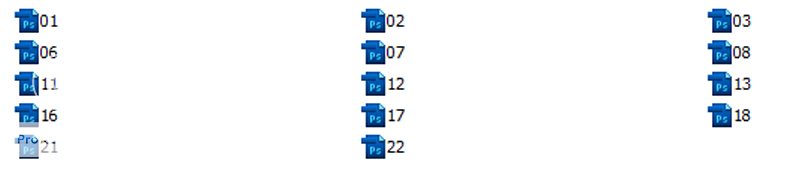
I just purchased Paul's Mega DVD. Most of the image files are in Photoshop format, so, if I navigate to a folder containg Photoshop files, this is what I used to see.

Image

I have no idea what the image looks like and have to open the file in Photoshop just to check what it is. It makes no difference if I choose to view medium or large icons!

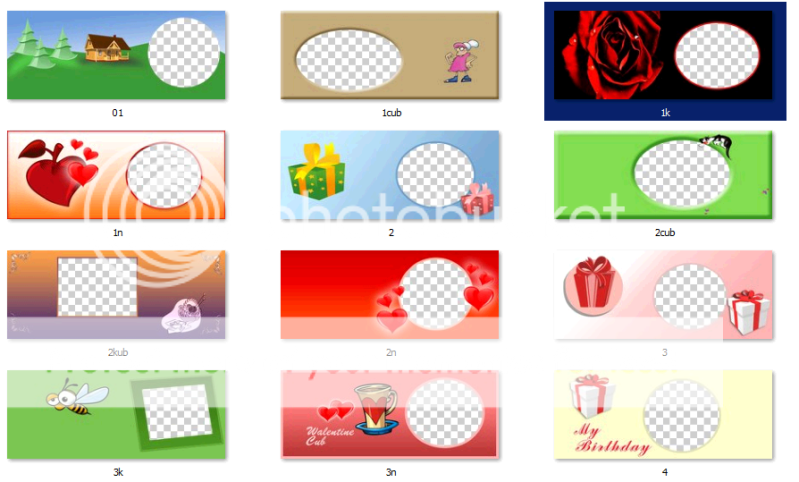
I've tried many of the so called solutions to this, Thumbnailers etc etc. The problem with most of these so called solutions is that you have to run their software and view the thumbs inside the software. I searched for ages trying to find a solution and tried many different packages along the way. But, none of them did what I wanted and that was the ability to see the file icon as the image it represented withing Windows Explorer. Then I discovered Mystic Thumbs and for me, it ticked ALL the boxes. Instead of seeing the rather useless .psd icon I now see this:

Image

The software is available for a 30 day evaluation http://mysticcoder.net/mysticthumbs.html and is only $25 if you decide you like it.

I have nothing at all to gain in telling you this :)
Neoflex Direct to Garment Printer, Brother BAS-463 3 Head Embroidery Machine, Gerber Edge FX & 1, Gerber GS15Plus Plotter, Ricoh GX-7000 GelsPrinter, Adkins BETA Major Pneumatic Press, Graphtec CE5000-60 & Craft Robo, HTP616 Twinhead Mug Press & 2 Halogen Ovens.
John G
Posts: 3008
Joined: 15 Nov 2009, 05:00
Contact:

Re: Thumbnails - Viewing .psd etc

Post by John G »

Good idea, but I get a preview thumbnail when importing into Coreldraw so for me it would be pointless.
User avatar
Stitch Up
Posts: 1461
Joined: 01 Oct 2009, 05:00
Contact:

Re: Thumbnails - Viewing .psd etc

Post by Stitch Up »

Maybe not John but what if you had lots of mixed file formats in one folder .cdr, .psd .ai ? If all you use is Coreldraw, fine, but if like me you use a whole host of graphic software ....... and it just illustrates my point, you have to run the application associated with the file - in your case Coreldraw, just to see what it is.
Neoflex Direct to Garment Printer, Brother BAS-463 3 Head Embroidery Machine, Gerber Edge FX & 1, Gerber GS15Plus Plotter, Ricoh GX-7000 GelsPrinter, Adkins BETA Major Pneumatic Press, Graphtec CE5000-60 & Craft Robo, HTP616 Twinhead Mug Press & 2 Halogen Ovens.
John G
Posts: 3008
Joined: 15 Nov 2009, 05:00
Contact:

Re: Thumbnails - Viewing .psd etc

Post by John G »

Yes, I can see your point - it would be handy if using different graphic programs. Its looks a handy bit of software.
User avatar
Draner
Posts: 68
Joined: 13 May 2011, 17:56
Contact:

Re: Thumbnails - Viewing .psd etc

Post by Draner »

Its not a problem on the Mac or Windows 7.
Another option is just to use Adobe Bridge or I have just find this plugin.

http://www.josh.biz/technical-notes/vie ... n-windows/

Cant test it but there are some good comments on the site
Andy no longer @ BMS
User avatar
Stitch Up
Posts: 1461
Joined: 01 Oct 2009, 05:00
Contact:

Re: Thumbnails - Viewing .psd etc

Post by Stitch Up »

Draner;25902 wrote:Its not a problem on the Mac or Windows 7.
I'm using Windows 7 Ultimate - does it show .psd files as an image thumbnail? I didn't think it did.

Do remember, Mystic Thumbs cater for a lot more file types than just Photoshop.
Neoflex Direct to Garment Printer, Brother BAS-463 3 Head Embroidery Machine, Gerber Edge FX & 1, Gerber GS15Plus Plotter, Ricoh GX-7000 GelsPrinter, Adkins BETA Major Pneumatic Press, Graphtec CE5000-60 & Craft Robo, HTP616 Twinhead Mug Press & 2 Halogen Ovens.
User avatar
Draner
Posts: 68
Joined: 13 May 2011, 17:56
Contact:

Re: Thumbnails - Viewing .psd etc

Post by Draner »

I may be wrong about win7, I use it at work, Im sure the thumbnails come up for .PDS. It is of course possible I'm mistaken.
Andy no longer @ BMS
User avatar
Paul
Posts: 8557
Joined: 28 Sep 2009, 05:00
Contact:

Re: Thumbnails - Viewing .psd etc

Post by Paul »

yep JOhn. windows in standard can not show adobe files as a thumbnails. you can see them in adobe bridge but not as normal icons in windows.
I have other solution for this that i use and its working on the vistaand xp. never tryd this on win 7 tho...
but good thing is its free :)

you can download it from me here
http://www.howtoprintstuff.co.uk <-- How To Print Stuff BLOG
User avatar
Stitch Up
Posts: 1461
Joined: 01 Oct 2009, 05:00
Contact:

Re: Thumbnails - Viewing .psd etc

Post by Stitch Up »

So that's .psd files. What about .ai .cdr .dds

and then there's all the other features i.e. transparency

Transparency support. For each file format you can define how MysticThumbs generates thumbnails:
  • No transparency
  • Transparent - so you see the folder/desktop behind the thumbnail
  • Checkboard - gives you a distinctive backdrop behind the thumbnail that shows the transparent or semi-transparent areas.
Image viewer via View context menu for all supported and enabled image types.
Icon overlays enable/disable and selectable per file format / extension.
Maximum image size - performance enhancement to prevent thumbnail generation for excessively large images. Definable for each file type.
Scale Up - for small images allows the generation of full size thumbnails for thumbnails larger than the image.
Thumbnail cache clear - to easily clear the entire thumbnail cache.
Per image refresh - refresh the thumbnail of images if required.
Per image options (transparency/scale up) - some images may not conform to the default options for that image type - use this context menu option to override the default.
Folder icon enhancement.
  • Vista and Windows 7 do not refresh the folder icon for image folders very well. MysticThumbs improves upon this.
  • Use the refresh option on a folder to update the folder's images and it's icon.
  • Generated thumbnails of images automatically update their parent folder icon.
System tray applcation to inform you when thumbnails are being generated by MysticThumbs. Quick access to the control panel for options.
Windows supported image types enhancement. MysticThumbs can override the default Windows supported image types (jpeg, png, tiff) so you can get the benifits of MysticThumbs features such as transparency, maximum image size etc.
Color profile support.
PSD Photoshop images all formats and bit depths supported. Internal thumbnail used for excessively large images.
PSP Paint Shop Pro images, all versions supported.
DDS almost all formats and bit depths supported for all your game textures. Cube maps represented as a cross.
Enhanced support for system supported images, PNG, JPG, BMP, TIFF, GIF - all the benefits of MysticThumbs customization such as transparency support.
Thumbnail adornment options - drop shadow or disable.
Network thumbnail handling support.
Localization - 15 languages supported.
Plugin support for custom file formats.
Automatic updates.

Phew, that took some typing :)
Neoflex Direct to Garment Printer, Brother BAS-463 3 Head Embroidery Machine, Gerber Edge FX & 1, Gerber GS15Plus Plotter, Ricoh GX-7000 GelsPrinter, Adkins BETA Major Pneumatic Press, Graphtec CE5000-60 & Craft Robo, HTP616 Twinhead Mug Press & 2 Halogen Ovens.
AdamB
Posts: 2044
Joined: 10 May 2010, 10:00
Contact:

Re: Thumbnails - Viewing .psd etc

Post by AdamB »

Paul;25906 wrote:I have other solution for this that i use and its working on the vistaand xp. never tryd this on win 7 tho...
but good thing is its free :)

you can download it from me here
Sorry John - I've been watching this post today as I too have the pain with psd previews and the amount of times I have looked for a solution but 'sacked it' after 5 minutes ................

.................. so Paul, what's this then? (if you don't mind me asking). I had a look at the link and it's a rar file that when unzipped has another rar file with a tif and a cmd file ????
Membership scheme now available - Just £10 per year - Regular Supplier Discounts and Special Offers!
(contact Admin for more details)
Post Reply

Who is online

Users browsing this forum: No registered users and 1 guest