
Epson RX595, InkXPro ink (with ICC), and terrible color output

Having Problems? Come on in!
Post Reply
cdx
Posts: 5
Joined: 17 Aug 2024, 00:52
Contact:

Re: Epson RX595, InkXPro ink (with ICC), and terrible color output

Post by cdx »

I have an Epson RX595 photo printer that uses CMYK plus LC and LM. I have two ICC profiles from InkXPro. The first one I used was very bad; the second has been better but is either still imperfect, or something else is going on with my printer. Note I was dumb and didn't do any test prints with regular inkjet cartridges before installing the InkXPro CISS kit, which was prefilled with their sublimation ink, so I have not confirmed that the printer is at 100% with regular ink.

Some stuff prints really well, but I'm having very strange problems with lighter shades. It seems like certain colors are entirely replaced when printed.

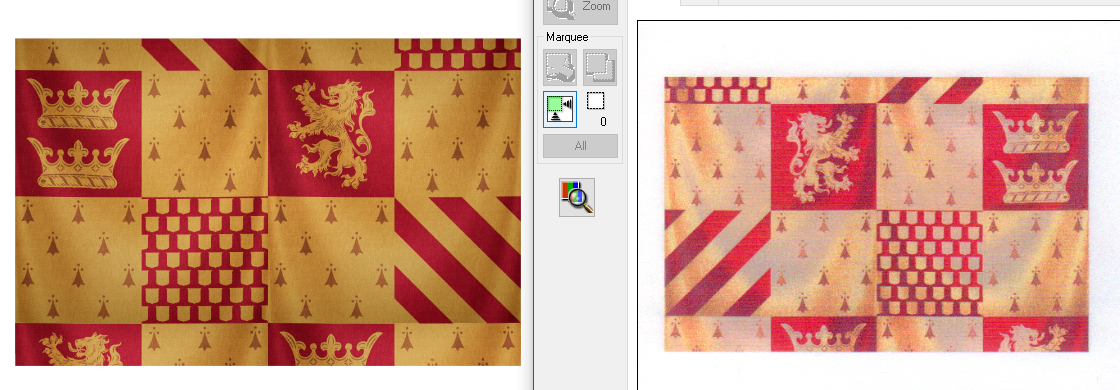
I was working on a project for a family member using the below source image. I used the relative colorimetric rendering intent, and Affinity Publisher managed the color profile, using InkXPro's profile. Color management on the printer is disabled. I'm running Windows 10, and also assigned the InkXPro profile to my printer in the Windows color management control panel. I did a test print to sublimate on a PET business card, and this image also shows what the printed output looked like before I sublimated it. The right image is the preview from the RX595's scanner.
Image

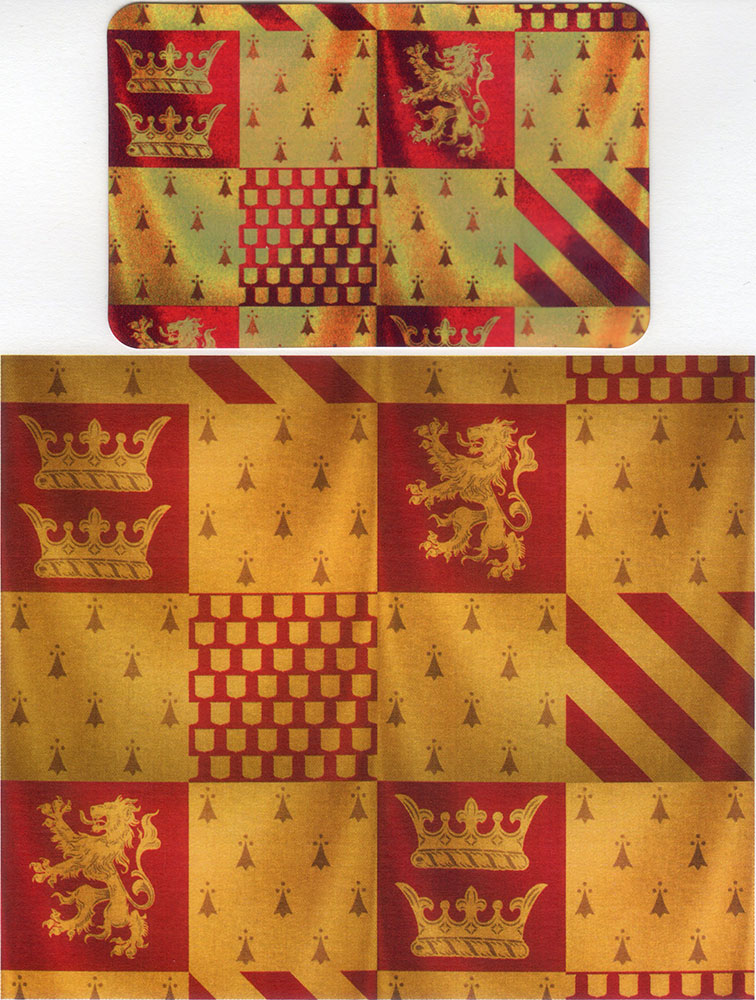
This is what the print looks like sublimated on PET, compared against the same image printed from my HP LaserJet M477 color laser printer. Note that I have never color calibrated my laser printer, and its current color output is a bit biased toward yellow.
Image

I've contacted InkXPro a few times, and they think my problem is not with the ICC profile. I sought help online elsewhere, and was told I need to pay for a custom ICC profile. What do you all think? If my problem really is color calibration, and InkXPro can't help me further, I'm open to getting the tools to do the calibration myself (not the $1k+ hardware, I mean DataColor's prosumer kit).

I've done loads of nozzle check patterns, and all six colors are represented perfectly, with no gaps or issues. Some stuff looks really good, but this weird problem with light/dark contrast is noticeable in certain images, and always in photos.

Thanks!
Attachments
vB_ID:7391
vB_ID:7391
2024-08-16_12-06-18-444_escndv-Preview.jpg (20.88 KiB) Not viewed yet
User avatar
webtrekker
Posts: 2540
Joined: 06 Sep 2016, 13:02
Contact:

Re: Epson RX595, InkXPro ink (with ICC), and terrible color output

Post by webtrekker »

In Affinity (or Photoshop, Gimp, whatever ...), are you working in RGB or CMYK?
cdx
Posts: 5
Joined: 17 Aug 2024, 00:52
Contact:

Re: Epson RX595, InkXPro ink (with ICC), and terrible color output

Post by cdx »

webtrekker;154224 wrote:In Affinity (or Photoshop, Gimp, whatever ...), are you working in RGB or CMYK?
Document profile is set to RGB. Affinity defaults to an sRGB 2.1 profile. I was advised to try ProPhoto RGB (included by Affinity), but that didn't make a difference. I've also tried setting the document profile to the sublimation ICC without success.
pw66
Posts: 1314
Joined: 05 Nov 2015, 22:59
Contact:

Re: Epson RX595, InkXPro ink (with ICC), and terrible color output

Post by pw66 »

Have you set the correct print settings in the printer preferences?
Have you selected the correct paper quality and print quality - it should be Matt or Epson Matt set to the best quality setting available.
cdx
Posts: 5
Joined: 17 Aug 2024, 00:52
Contact:

Re: Epson RX595, InkXPro ink (with ICC), and terrible color output

Post by cdx »

pw66;154228 wrote:Have you set the correct print settings in the printer preferences?
Have you selected the correct paper quality and print quality - it should be Matt or Epson Matt set to the best quality setting available.
Yes on all counts. The printer is not doing any color correction.
Post Reply

Who is online

Users browsing this forum: Google [Bot] and 2 guests