
Hi all, it's been a while.
I currently have the Ricoh SG3110DN and am using it for mug printing purposes. What I'd like to know is - Can the inks which are sawgrass sublijet-R be used to create prints for t-shirts, the tranfer paper I have is Truepix, and if so, is it a polycotton mix material I should be attempting to print to or 100% poyester.
Any advice would be greatly appreciated.
Many thanks
HF
Ricoh SG3110DN Printing
-
Hoffman Fisher
- Posts: 23
- Joined: 23 May 2012, 08:15
- Contact:
Re: Ricoh SG3110DN Printing
Certainly, you can use your Ricoh3110 , Sublijet-R and TruePix paper to transfer onto textiles. You can use either 100% polyester or 50/50% polycotton, depending on the effect you want to generate - on the polycotton, only the polyester fibres will fix the sublimation ink, so you will obtain a " faded" aspect to the colours. You are not restricted either to only white textiles - sublimation prints can be made on any colour, as long as the image is darker than the textile ( think dark purple print onto a lilac t-shirt, or black onto a grey t-shirt).
Have a look at our web-site for more ideas.
Have a look at our web-site for more ideas.
-
Hoffman Fisher
- Posts: 23
- Joined: 23 May 2012, 08:15
- Contact:
Re: Ricoh SG3110DN Printing
Thanks for your reply Sawgrass, but just to clarify - I can't print a black and white image onto a black t-shirt? And this is because black ink won't be seen on a black t-shirt for obvious reasons and there is no white ink? But I can print on any colour T-shirt as long as the image is of a darker colour.
Many thanks and all the best
HF
Many thanks and all the best
HF
Re: Ricoh SG3110DN Printing
Hi all, I have just got this printer myself, sawgrass subliget r inks and im using trupix paper, I am using this for mug printing to start with, I have done a few mugs and I am impressed with the results, many of the non photo images are brilliant, but I am finding that many photograph images the skin tones are not accurate, when I print them out they look solorised almost, when I press them they are improved but skin is looking almost orange or very well tanned, brown hair may look darker than usual,i have today done a new update via the sawgrass site but not had time to test this as yet, im using coral draw 12 to sort the image , I think the new update said to disarm the colour pallete in coral which has now been done, im running the mug press at 170 with 160 as the dummy mug temp I have a press time of 160 seconds the pressure is there, but not over tight and im checking the mug is central in the press, could anyone offer any advice as to something I am missing, a newbie classic error or what I can do to recify this problem, I forgot to mention the image used is to a high standard and saved at 400 dpi.
thanks in advance
steve
thanks in advance
steve
-
arthur.daley
- Posts: 538
- Joined: 19 Oct 2013, 14:38
- Contact:
Re: Ricoh SG3110DN Printing
how do you know what you are seeing on your screen is accurate?? Download this image
http://www.chromix.com/downloadarea/tes ... lor57s.jpg
Its a colour chart used for assessing Fuji Frontier photolabs and has a good range of colours, skintones and grey scale on it. If you have nothing to calibrate your screen with the least thing you can do is to take a look at this image. Ideally get it to fill the screen or failing that drop it onto a large black canvas so your eye isn't distracted from the test image. If it doesn't look good - you have screen issues. You could also try printing it onto a mug. At least you know you are starting out with a good file.
I take it you are using Powerdriver? Download and install the ICC profile from Sawgrass website - its a vast improvement over Powerdriver. If you are not convinced print a Fuji mug via Powerdriver then print it again via ICC. You really should see an improvement in skin tones and grey scale accuracy.
If you want to calibrate your screen - the only reason why you might not want to calibrate is you are lucky enough to have a screen that gave you accurate colour, brightness and contrast straight out of the box. Get yourself a simple colorimeter - something like an Xrite Color Munki, £67 plus vat from Calumetphoto, may be cheaper elsewhere , ask your friend google.
Just my ten pennoth ;o)
http://www.chromix.com/downloadarea/tes ... lor57s.jpg
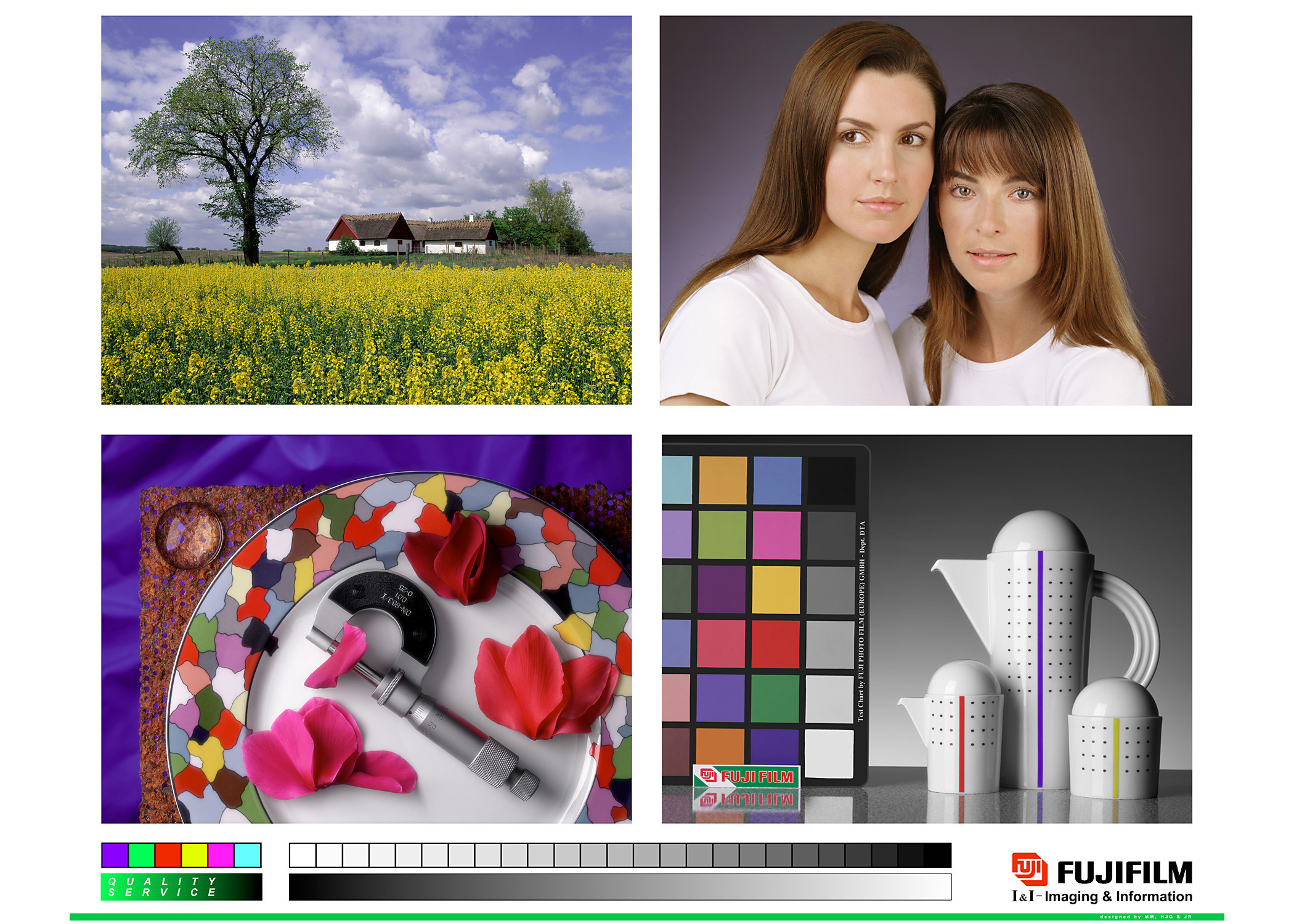
Its a colour chart used for assessing Fuji Frontier photolabs and has a good range of colours, skintones and grey scale on it. If you have nothing to calibrate your screen with the least thing you can do is to take a look at this image. Ideally get it to fill the screen or failing that drop it onto a large black canvas so your eye isn't distracted from the test image. If it doesn't look good - you have screen issues. You could also try printing it onto a mug. At least you know you are starting out with a good file.
I take it you are using Powerdriver? Download and install the ICC profile from Sawgrass website - its a vast improvement over Powerdriver. If you are not convinced print a Fuji mug via Powerdriver then print it again via ICC. You really should see an improvement in skin tones and grey scale accuracy.
If you want to calibrate your screen - the only reason why you might not want to calibrate is you are lucky enough to have a screen that gave you accurate colour, brightness and contrast straight out of the box. Get yourself a simple colorimeter - something like an Xrite Color Munki, £67 plus vat from Calumetphoto, may be cheaper elsewhere , ask your friend google.
Just my ten pennoth ;o)
Re: Ricoh SG3110DN Printing
Hi Arthur, thanks for the reply, I did download the driver yesterday and I will check to see if this solves the problem today, I use a spyder to calibrate my screen at the moment, the images look good to me.
thanks again
steve
thanks again
steve
Re: Ricoh SG3110DN Printing
Hi Steve,
I, too , have found printing photographs (bitmaps) harder to print than vectors. Have you seen the Sawgrass Sublimation guide? - http://www.sawgrassink.com/education-ev ... -guidebook - it has a useful section on preparing photos for subliprintng.
I'm still testing but currently my setup works better when I use an HDR setting on my photos - something I wouldn't do if I was printing on paper or canvas. Also, I set my picture to register at 200dpi before importing into CorelDraw- it seems that it's better for the photo editing software to handle the downsizing than the CD to printer conversion.
(My setup - Ricoh printer, Sublijet ink, trupix paper, Corel Draw X5, Spyder 3)
Regards
Karen
I, too , have found printing photographs (bitmaps) harder to print than vectors. Have you seen the Sawgrass Sublimation guide? - http://www.sawgrassink.com/education-ev ... -guidebook - it has a useful section on preparing photos for subliprintng.
I'm still testing but currently my setup works better when I use an HDR setting on my photos - something I wouldn't do if I was printing on paper or canvas. Also, I set my picture to register at 200dpi before importing into CorelDraw- it seems that it's better for the photo editing software to handle the downsizing than the CD to printer conversion.
(My setup - Ricoh printer, Sublijet ink, trupix paper, Corel Draw X5, Spyder 3)
Regards
Karen
-
iriskellebell
- Posts: 1
- Joined: 05 Dec 2013, 08:36
- Contact:
Re: Ricoh SG3110DN Printing
Hello
Regarding to this topis:
I had exactly the same issue 6 months ago,I tried hardly to sort out it but unfortunately did not work.I was continuously looking on net for solution and I went through almost 1000 sites. One day I got a website which helped me a lot I have download some software for it, install it on my printer and Finally I repaired it.IF you still facing this problem Just check this site once
May be get some useful and helpful information or software for it.
http://www.wasteinkpads.com/
Thanks
Stella
Regarding to this topis:
I had exactly the same issue 6 months ago,I tried hardly to sort out it but unfortunately did not work.I was continuously looking on net for solution and I went through almost 1000 sites. One day I got a website which helped me a lot I have download some software for it, install it on my printer and Finally I repaired it.IF you still facing this problem Just check this site once
May be get some useful and helpful information or software for it.
http://www.wasteinkpads.com/
Thanks
Stella
Who is online
Users browsing this forum: No registered users and 3 guests