
[ATTACH=CONFIG]1981[/ATTACH]
Original
[ATTACH=CONFIG]1982[/ATTACH]
Picture on left is with ICC picture on right is sawgrass and Ricoh
My apologies Paul, I have spent all this time trying to work out how to put an image in a PM. With no success!
Janners
Paul --- Image
Re: Paul --- Image
- Attachments
-
- vB_ID:1982
- IMG_0020.jpg (34.22 KiB) Viewed 2 times
-
- vB_ID:1981
- Morgan resize.jpg (83.29 KiB) Viewed 2 times
-
- vB_ID:1980
- Morgan resize.jpg (84.16 KiB) Viewed 2 times
-
- vB_ID:1979
- Resized Morgan x 2.jpg (36.14 KiB) Viewed 2 times
Re: Paul --- Image
Is the ICC on the left mine for our printer or one Paul has made specific to yours?
If the former, would be interested if you send me the original file, so I can see what difference printing it on ours makes - this could see if it is the ICC being too specific to our printer (these are old machines now, so maybe they don't print as much the same as they used to) or maybe your settings are wrong somewhere?
If the former, would be interested if you send me the original file, so I can see what difference printing it on ours makes - this could see if it is the ICC being too specific to our printer (these are old machines now, so maybe they don't print as much the same as they used to) or maybe your settings are wrong somewhere?

Re: Paul --- Image
i understand is icc i made.
here is soft proofed image with your icc profile. as you can see there is no where near as much magenta as on your prints.
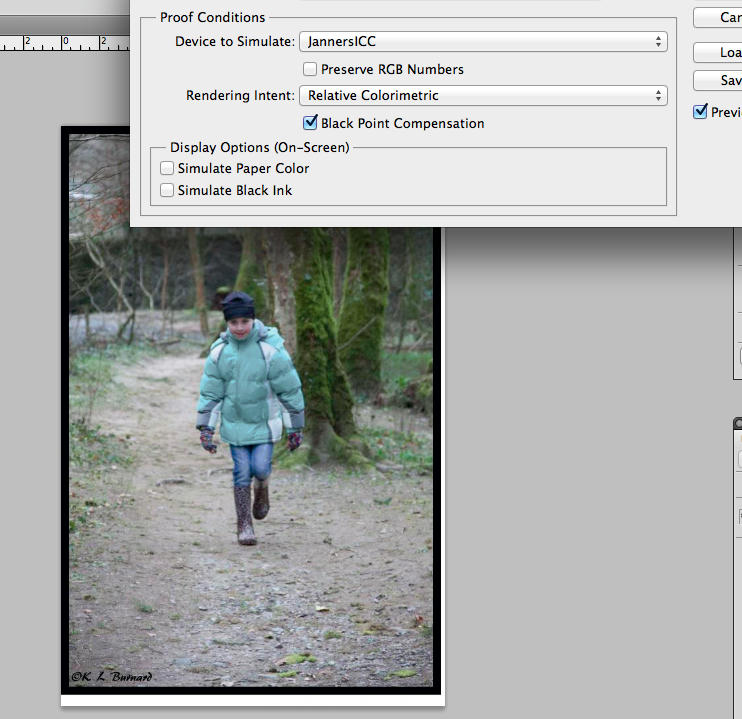
here is soft proofed image with your icc profile. as you can see there is no where near as much magenta as on your prints.
- Attachments
-
- vB_ID:1983
- Screen Shot 2013-10-07 at 23.15.15.jpg (13.54 KiB) Viewed 2 times
http://www.howtoprintstuff.co.uk <-- How To Print Stuff BLOG
Re: Paul --- Image
Morning Guys,
Hi Paul Tim sent over his profile from his own 7600 for me to look at how to install etc whilst you were doing mine for me.
The image on the left is Paul's profile, the one on the right is the Ricoh /Sawgrass set up.
BUT both profiles (Tim's own and the one done by Paul) produce identical images, hence my line of thinking that the profiles are correct and I have a setting wrong somewhere.
Prior to going over to sub inks I printed photo's with Epson inks and had beautiful photos. Hence we know the printer was OK.
Nozzle check is perfect, literally, no dashes missing anywhere.
When I get chance this morning I will try using PS CS6, (I don't use photoshop so this could be a challenge), with the settings provided, and see what happens.
Paul I have been using the the unisub guidelines of 90 seconds at 200 degrees, also which RGB Paul (sRGB1966-2.1 or Adobe RGB 1998)?
Thanks for your input guys.
Janners
Just a note ... there are two magentas in the printer Magenta and Light Magenta.
Hi Paul Tim sent over his profile from his own 7600 for me to look at how to install etc whilst you were doing mine for me.
The image on the left is Paul's profile, the one on the right is the Ricoh /Sawgrass set up.
BUT both profiles (Tim's own and the one done by Paul) produce identical images, hence my line of thinking that the profiles are correct and I have a setting wrong somewhere.
Prior to going over to sub inks I printed photo's with Epson inks and had beautiful photos. Hence we know the printer was OK.
Nozzle check is perfect, literally, no dashes missing anywhere.
When I get chance this morning I will try using PS CS6, (I don't use photoshop so this could be a challenge), with the settings provided, and see what happens.
Paul I have been using the the unisub guidelines of 90 seconds at 200 degrees, also which RGB Paul (sRGB1966-2.1 or Adobe RGB 1998)?
Thanks for your input guys.
Janners
Just a note ... there are two magentas in the printer Magenta and Light Magenta.
Re: Paul --- Image
If both profiles are producing the same results it reassuring that the problem is with the colour management set up you have, so should be solvable. (Also, I can assure you that our printers don't have a magenta cast to them.)
You should use Adobe RGB (1998) rather than sRGB.
If you don't use photoshop, which program are you currently using to print with?
You should use Adobe RGB (1998) rather than sRGB.
If you don't use photoshop, which program are you currently using to print with?
-
purpledragon

- Posts: 1514
- Joined: 15 Nov 2009, 05:00
- Contact:
Re: Paul --- Image
HI
just to bung my tuppence worth in and it may not mean anything but you are wondering if you havent set something up right i dont know if you picked up on it but in the 2 images you have posted 1 is mirrored the other isnt theres a reasonable chance that you are not printing from a set up profile etc or havnt quite set it up right if you missed the mirror image tick box its very possible you missed something else ,
but then i could be totally wrong !!!
just to bung my tuppence worth in and it may not mean anything but you are wondering if you havent set something up right i dont know if you picked up on it but in the 2 images you have posted 1 is mirrored the other isnt theres a reasonable chance that you are not printing from a set up profile etc or havnt quite set it up right if you missed the mirror image tick box its very possible you missed something else ,
but then i could be totally wrong !!!
Re: Paul --- Image
Purple
I suspect you are on the right line of thinking, I do think it is a check box somewhere that is causing the problem, the mirror image was just me not bothering.
Now to get my head around PS as both Paul and Pisquee are PS users where as I am coreldraw. The set up for the two is different. Wish me luck "Mis Amigos".
On a sad note..... I am finding all this rather interesting as I have learned so much so far about all sorts of things.... I am turning GEEK!
Janners.
I suspect you are on the right line of thinking, I do think it is a check box somewhere that is causing the problem, the mirror image was just me not bothering.
Now to get my head around PS as both Paul and Pisquee are PS users where as I am coreldraw. The set up for the two is different. Wish me luck "Mis Amigos".
On a sad note..... I am finding all this rather interesting as I have learned so much so far about all sorts of things.... I am turning GEEK!
Janners.
Re: Paul --- Image
Geek is good, is good to understand the tools you use in the job, how they work etc.
Re: Paul --- Image
Last time I looked at CorelDraw, I just found the colour management page confusing, and I think gave up in the end!
Which version are you using?
Which version are you using?
Re: Paul --- Image
Hi Pisquee
I am using the current one (X6) in coreldraw. I shall now dive into PS (can't be that hard, can it really.... reallly?). Follow your settings, and see what happens.
Geek ..... oh my giddy aunt.
Janners
I am using the current one (X6) in coreldraw. I shall now dive into PS (can't be that hard, can it really.... reallly?). Follow your settings, and see what happens.
Geek ..... oh my giddy aunt.
Janners
Who is online
Users browsing this forum: No registered users and 1 guest