Page 1 of 1
Re: Any Photoshop 'Experts' on here? I'm in need of some HELP! :)
Posted: 03 Mar 2011, 17:28
by Stitch Up
Hi guys
I could do with a few tips on using Photoshop!
A customer sent me an image file to be printed on a black shirt. The image is on a white background, usually not a problem as I select the white in the back ground and delete it. The problem I have with the image sent to me is that within the image there's more white that IS to be printed! When I select the white of the background, it also select the white in the image that I want to print as white.
I'm rambling - hope you get the idea

If anyone could give me some ideas, I'd be grateful.
John
Re: Any Photoshop 'Experts' on here? I'm in need of some HELP! :)
Posted: 03 Mar 2011, 17:36
by smitch6
if i have this problem i zoom in and select the white then just use a brush to change it to black
but with it zoomed in loads you can get near to the edges where the magic wand overlaps onto the pic
hope that makes sense

Re: Any Photoshop 'Experts' on here? I'm in need of some HELP! :)
Posted: 03 Mar 2011, 17:41
by AdamB
email me the pic John to
funky4gifts@yahoo.co.uk and I'll see what I can do mate
Adam
Re: Any Photoshop 'Experts' on here? I'm in need of some HELP! :)
Posted: 03 Mar 2011, 17:43
by AdamB
But if you want to do it yourself - select ALL the white, create a new layer then paste this to create a layer of all the white in the image.
Then delete the bits you want to keep, then slect all in that layer - then click back on the image and press delete - should work!
Re: Any Photoshop 'Experts' on here? I'm in need of some HELP! :)
Posted: 03 Mar 2011, 19:22
by Paul
send it over JOhn and I will sort it out for you
or if you want to do it uself then use Magic Wand tool.
Re: Any Photoshop 'Experts' on here? I'm in need of some HELP! :)
Posted: 03 Mar 2011, 21:45
by Stitch Up
Thanks for all the offers guys, very grateful.
Thanks to Adam for doing the biz
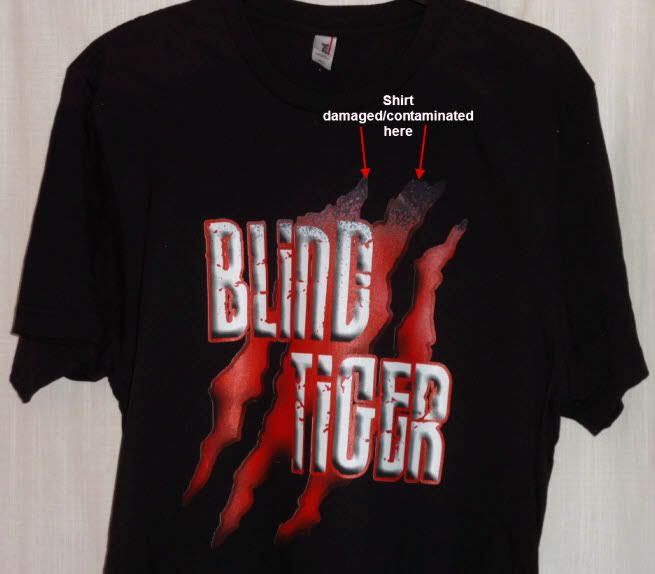
using layers, it worked a treat. I printed the image to an old shirt that had a stain at the top - hence the nad print at the top!
Re: Any Photoshop 'Experts' on here? I'm in need of some HELP! :)
Posted: 04 Mar 2011, 09:37
by Kaz
Even though you say the shirt was damaged, it still looks good to me
Re: Any Photoshop 'Experts' on here? I'm in need of some HELP! :)
Posted: 04 Mar 2011, 09:40
by AdamB
Kaz;17873 wrote:Even though you say the shirt was damaged, it still looks good to me
I was thinking the same thing Kaz - looks a kind of retro, washed-faded look ............... I would have bought it - if I was into large cat like creatures that can't see too well that is.
Re: Any Photoshop 'Experts' on here? I'm in need of some HELP! :)
Posted: 04 Mar 2011, 11:58
by Stitch Up
I trashed so many shirts while in the learning stages I decided to try and retrieve some. When a bad print was coming off the printer I would wash the shirt immediately to remove the wet ink!! The shirt in the picture is one of these 'retrieved shirts', I could still see the original print showing.
Adam, I'm not at home just now but will get back to you later. PM me your phone number if you wish.
John
Re: Any Photoshop 'Experts' on here? I'm in need of some HELP! :)
Posted: 18 Mar 2011, 20:40
by chongsta
In the magic wand tool toolbar you'll see 'contiguous'. Toggle between this so that the selection selects the main part of white around the image, the other will select anything of that colour from where you selected the colour to erase. Thats why it was selecting white within the main design, it was locking onto anything white. To get a good outline you should have the Tolerance set to 5.
Hope that helped stitch
Dave.
