Page 1 of 1
Re: Aluminum Metal Sheets Printing Issue - Horizontal Lines and smudge on edges
Posted: 01 Sep 2019, 06:49
by slee1106
- vB_ID:5868
- IMG_20190901_134117.jpg (89.53 KiB) Viewed 209 times
- vB_ID:5868
- IMG_20190901_134117.jpg (89.53 KiB) Viewed 209 times
- vB_ID:5868
- IMG_20190901_134117.jpg (89.53 KiB) Viewed 209 times
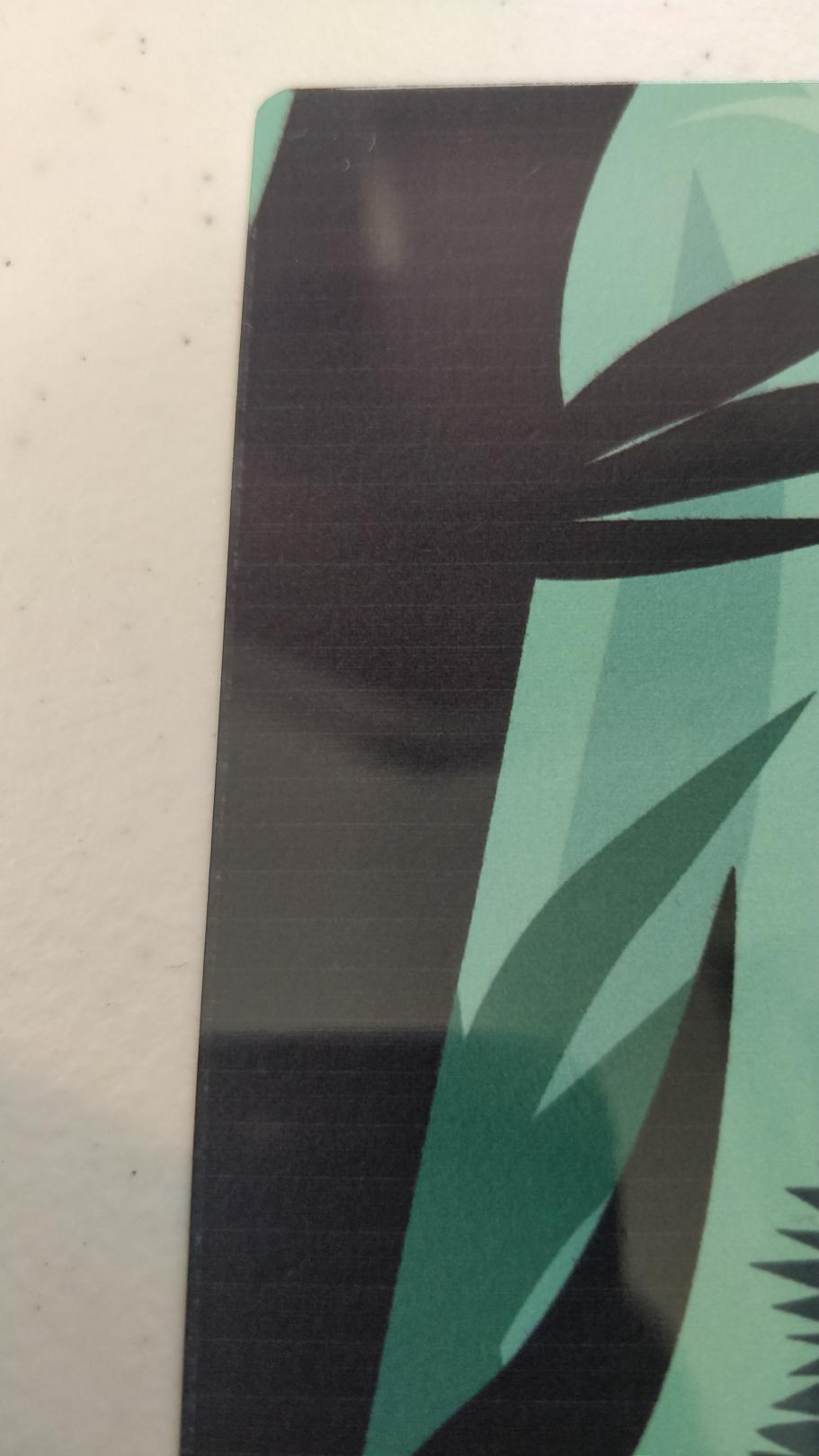
I'm new to sublimating metal sheets. Why are there horizontal lines when pressing? Is this from the printer settings? Also, I have been experiencing smudges particularly in dark colors. And there is a smudge on the 4 corners of the metal sheet I dont know where it comes from.
Settings are the ff:
Temp: 180 C
Time: 60-90
Epson Matte Color Settings
What are your comments/experiences with this and how to solve each one?
Re: Aluminum Metal Sheets Printing Issue - Horizontal Lines and smudge on edges
Posted: 01 Sep 2019, 09:24
by webtrekker
That looks like banding to me, caused by blocked nozzles. Can you upload a picture of a nozzle check?
What are the temps, times and pressures you are using when pressing?
Do you place your aluminium face-down on your print for pressing?
Do you use any layers of paper or kitchen roll underneath to help with any water vapour, which would produce smudging or marbling?
Re: Aluminum Metal Sheets Printing Issue - Horizontal Lines and smudge on edges
Posted: 01 Sep 2019, 11:06
by slee1106
Thank you! Is the solution to just do head cleaning?
My settings are:
Temp: 180 C
Time: 60-90 seconds (The picture I posted was a 90 second one
Pressure: Light pressure
Aluminum face down. One paper below the print paper and one paper on top of the metal
It's very humid here around 60%
Re: Aluminum Metal Sheets Printing Issue - Horizontal Lines and smudge on edges
Posted: 01 Sep 2019, 11:10
by slee1106
slee1106;139772 wrote:Thank you! Is the solution to just do head cleaning?
My settings are:
Temp: 180 C
Time: 60-90 seconds (The picture I posted was a 90 second one
Pressure: Light pressure
Aluminum face down. One paper below the print paper and one paper on top of the metal
It's very humid here around 60%
[ATTACH=CONFIG]5869[/ATTACH][ATTACH=CONFIG]5870[/ATTACH]
The nozzle check is complete but if you look closely the horizontal there are some small bumps in the print
Re: Aluminum Metal Sheets Printing Issue - Horizontal Lines and smudge on edges
Posted: 01 Sep 2019, 11:11
by slee1106
Here is a picture of my printout [ATTACH=CONFIG]5871[/ATTACH]
Re: Aluminum Metal Sheets Printing Issue - Horizontal Lines and smudge on edges
Posted: 02 Sep 2019, 12:35
by GoonerGary
slee1106;139772 wrote:Thank you! Is the solution to just do head cleaning?
My settings are:
Temp: 180 C
Time: 60-90 seconds (The picture I posted was a 90 second one
Pressure: Light pressure
Aluminum face down. One paper below the print paper and one paper on top of the metal
It's very humid here around 60%
Your issues have nothing to do with printing on metal. You need to perform 3-4 head cleans until you get a decent print. Or do it once and leave the printer sitting overnight. Make sure that you have done a head alignment test and have your settings on 'Best Photo'.
Re: Aluminum Metal Sheets Printing Issue - Horizontal Lines and smudge on edges
Posted: 02 Sep 2019, 13:15
by webtrekker
Yeah, this is definitely banding caused by blocked nozzles.