Page 1 of 2
Re: Where am I going wrong?
Posted: 16 Aug 2019, 13:01
by Rusty
Hello.
Having successfully printed a few mugs on my new press, I tried to press a teal coloured design and ended up with 3 different colours.
Here's an image:
https://ibb.co/xH0CScG
Here's the colour I wanted it to look like:
https://ibb.co/NK1RcZy
Any idea what's happened?
Thanks.
Re: Where am I going wrong?
Posted: 16 Aug 2019, 13:51
by socialgiraffe
Need much more information...
Kit, Inks, Printer Profile, Paper and Mug Supplier please
Re: Where am I going wrong?
Posted: 16 Aug 2019, 13:58
by Rusty
socialgiraffe;139549 wrote:Need much more information...
Kit, Inks, Printer Profile, Paper and Mug Supplier please
Printer, ink, profile and paper:
https://www.inkexperts.co.uk/product/su ... -a4-paper/
Mugs:
https://subliblanks.com/products/11oz-s ... coated-mug
Press:
http://www.monsterdoodles.co.uk/mug_sub ... paper.html
Thanks giraffe.
Re: Where am I going wrong?
Posted: 16 Aug 2019, 14:01
by socialgiraffe
Cool, so decent enough kit etc.
Forgot to ask, what software are you designing/creating the artwork in?
Also, are you working in RGB format or CMYK?
Re: Where am I going wrong?
Posted: 16 Aug 2019, 14:09
by Rusty
socialgiraffe;139551 wrote:Cool, so decent enough kit etc.
Forgot to ask, what software are you designing/creating the artwork in?
Also, are you working in RGB format or CMYK?
I'm using Photoshop CS6. Not sure about the RGB or CMYK question, sorry.
The only issue I ran into when setting up the print settings/ICC was that my menu was different to the ICC setup guide that Ink Experts sent me.
This is what the guide is telling me to do in 'Print settings':
https://ibb.co/fpC0NRV
This is my 'Print settings' menu:
https://ibb.co/6gJJw5v
Thanks.
Edit: So basically I haven't been able/don't have the option to select 'No colour adjustment'.
Re: Where am I going wrong?
Posted: 16 Aug 2019, 14:15
by socialgiraffe
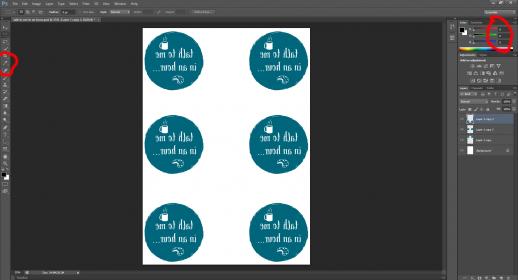
Can you do a screen shot of the PHOTOSHOP screen with your artwork open?
I have a feeling it is just down to colour adjustment and you will be fine.
Re: Where am I going wrong?
Posted: 16 Aug 2019, 14:19
by Rusty
socialgiraffe;139553 wrote:Can you do a screen shot of the PHOTOSHOP screen with your artwork open?
I have a feeling it is just down to colour adjustment and you will be fine.
I appreciate your help.
https://ibb.co/0YjtSfY
Thanks.
Re: Where am I going wrong?
Posted: 16 Aug 2019, 14:25
by socialgiraffe
If you click on the eye dropper tool, then click anywhere in the colour the right hand RGB value should be around 0, 102, 123. It looks pretty close to be honest.
Have you made sure that GLOSSY paper is selected in the advanced printer properties?
- vB_ID:5842
- Untitled.jpg (17.05 KiB) Viewed 225 times
I will tag Ink Experts as they are far more skilled in this area than me, given all the information you have provided then it should be a really simple fix.
Re: Where am I going wrong?
Posted: 16 Aug 2019, 14:31
by Rusty
[QUOTE=socialgiraffe;139555]If you click on the eye dropper tool, then click anywhere in the colour the right hand RGB value should be around 0, 102, 123. It looks pretty close to be honest.
Have you made sure that GLOSSY paper is selected in the advanced printer properties?
I will tag Ink Experts as they are far more skilled in this area than me, given all the information you have provided then it should be a really simple fix.[/QUOTE]
It is indeed 0, 102, 123.
No, everywhere that I've been given the option I've selected matte paper (even on the printer itself). I can't remember where but one instruction said you should select matte because it puts more ink onto the paper.
Okay, cheers.
Re: Where am I going wrong?
Posted: 16 Aug 2019, 14:33
by InkExperts
Ok, looking at your printer settings the drivers are not installed fully.. you have the bare bones Windows driver rather than the full Epson driver. Without the full driver you cannot follow the colour management setup guide. i.e there is no advanced area to turn off the printers icm to leave the icc in control of the colour.
I would say that is the main issue here. Teal / aqua colours are notoriously tricky to get right and will print out blue'ish until heat pressed. Without the icc working they are really hard to get right.
To install the driver correctly you can download from the Epson website here -
https://www.epson.co.uk/support?product ... uct_search (download Product Setup - first item as thats the full drivers package)
I imagine as you've setup on WIFI Windows has just 'installed' the printer, which is fine in most cases for regular printing but with sublimation full drivers are required for setting the icm / icc and also setting the paper / quality settings.
Last thing would be to check the temp and time. I press mugs at 175c for 180secs. I start timer from closing heat press and removing when 180 secs expire.
Alex