Page 1 of 1
Re: Cameo 3 & ICC colour profile
Posted: 05 Aug 2019, 18:02
by Pixelpusher
Hi,
Any cameo users found a way to print from the cameo using the correct ICC for their printer?
Im trying to print and cut using the cameo 3 as I want the reg marks, but with the epson 7710 & inktec inks when I print the design its coming out black & white as the cameo will not let me chose my colour profile on the print setup page.
Ive tried importing the finished design into silhouette adding the reg marks then exporting as a pdf, opening the PDF into PS and printing it out onto the sub page using the correct ICC profile, but when I try to contour the finish printed design, sadly it is slightly off

Any one have a work around?
Cheers

Re: Cameo 3 & ICC colour profile
Posted: 06 Aug 2019, 09:24
by webtrekker
I use SCAL 5 for all my print & cut jobs. This software doesn't support ICC profiles either, so I use the print to PDF method then import the PDF into Photoshop for printing, which is spot on every time. I suspect you need to fiddle about with it a bit, making sure you have no page-scaling, fit-to-page settings, etc set and also that any borderless printing settings are unchecked.
My workflow is: SCAL - - > BullZip PDF driver - - > Photoshop, then straight to my cutter for cutting.
Re: Cameo 3 & ICC colour profile
Posted: 06 Aug 2019, 09:49
by Pixelpusher
Cheers buddy, will give the PDF file another go, Im pretty sure I can get it right, but it just may take some messing about
Re: Cameo 3 & ICC colour profile
Posted: 06 Aug 2019, 10:54
by webtrekker
No worries. I seem to remember having to fiddle about myself when I first used this method.
Here are the settings I use in the BullZip PDF Printer dialogue ...
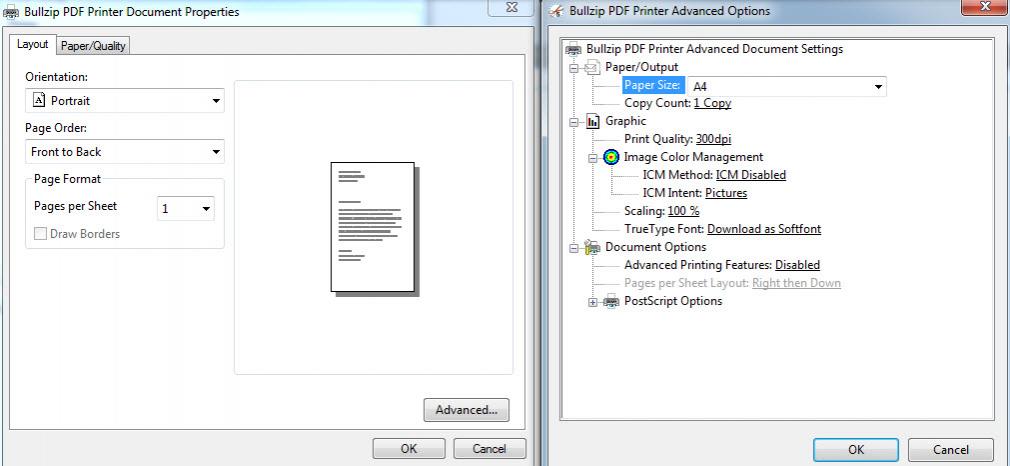
- vB_ID:5829
- bullzip_1.jpg (55.52 KiB) Viewed 5 times
I haven't provided any printer driver settings for Photoshop as I use Ricoh printers.
Re: Cameo 3 & ICC colour profile
Posted: 06 Aug 2019, 11:07
by Pixelpusher
Cheers pal, Ill let you know how I get on
Re: Cameo 3 & ICC colour profile
Posted: 08 Aug 2019, 18:24
by GoldRapt
How do you cut through Photoshop please, some pug in no doubt but which one?
Re: Cameo 3 & ICC colour profile
Posted: 08 Aug 2019, 21:46
by webtrekker
GoldRapt;139455 wrote:How do you cut through Photoshop please, some pug in no doubt but which one?
You can't. No cutting plugin exists for Photoshop as it's not a vector design software. With a Cameo you'll usually use Silhouette Designer. I personally use Sure Cuts A Lot 5 (SCAL5) with my Silver Bullet cutter, which also handles cutting from a Cameo.
Re: Cameo 3 & ICC colour profile
Posted: 09 Aug 2019, 08:53
by GoldRapt
webtrekker;139416 wrote:My workflow is: SCAL - - > BullZip PDF driver - - > Photoshop, then straight to my cutter for cutting.
Your workflow confused me, hence my question
webtrekker;139458 wrote:You can't. No cutting plugin exists for Photoshop as it's not a vector design software. With a Cameo you'll usually use Silhouette Designer. I personally use Sure Cuts A Lot 5 (SCAL5) with my Silver Bullet cutter, which also handles cutting from a Cameo.
I don't have the ability to print and cut with my cutter. Hence my interest, don't know what a cameoo 3 is either, but clearly its not a print and cut machine.
Presumably you set your reg marks and contour cut lines in a colour not in the artwork, print from Photoshop then feed it into your cutter for reg and cut?
Re: Cameo 3 & ICC colour profile
Posted: 09 Aug 2019, 09:13
by webtrekker
Ah, ok. I mentioned Cameo because that is what the thread is about, but obviously you have a different cutter. You should start a new thread with your problem and you may receive a more detailed answer.
Re: Cameo 3 & ICC colour profile
Posted: 09 Aug 2019, 10:31
by GoldRapt
webtrekker;139462 wrote:Ah, ok. I mentioned Cameo because that is what the thread is about, but obviously you have a different cutter. You should start a new thread with your problem and you may receive a more detailed answer.
I don't have a problem, I was interested in what was being explained in this thread.