Page 1 of 1
Re: Faint mug printing
Posted: 17 Aug 2017, 19:17
by HimAndHer
Hey folks
Newbie with his hand up.
I have a Galaxy Mug Press Pro
Ricoh 3110dn
Sawgrass sublijet r ink (this is first ink installed)
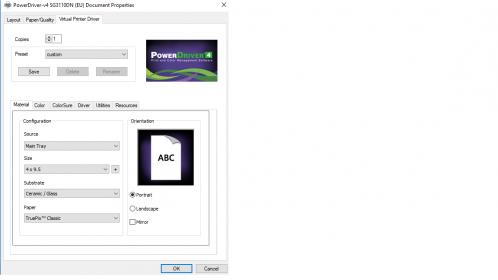
Powerdriver v4 installed
Dino Coating DyeSup Paper
Dyno coated Subli blank mugs
I believe I was all set up but when I press the mug at 185 c for 160 seconds the print on the mug is so feint. Had three attempts but still the same result.
Any obvious errors or pointers for a man in distress
Thanks in advance folks

Sean
- vB_ID:4780
- settings.jpg (12.4 KiB) Viewed 180 times
- vB_ID:4780
- settings.jpg (12.4 KiB) Viewed 180 times
Re: Faint mug printing
Posted: 17 Aug 2017, 19:44
by Quinsfan
Printed on the correct side of the paper? Has the paper got a definitive front and back? If not lick the tips of your fingers and pinch the paper between them. The side you need to print on should stick to your finger when released.
Sent from my iPhone using Tapatalk
Re: Faint mug printing
Posted: 17 Aug 2017, 21:33
by HimAndHer
Thanks Iain
The back of the paper has Dino Coatings DyeSub Paper on it so I assume the other plain side is the print side.
It started so well this afternoon....

Fingers crossed I will find the answer
Sean
Re: Faint mug printing
Posted: 17 Aug 2017, 22:26
by HimAndHer
I'm assuming that the substrate setting is correct at Ceramic/Glass
and the paper setting is a mystery as the one I'm using is not in the drop-down. I've tried a couple but no change.
Thanks again
Re: Faint mug printing
Posted: 17 Aug 2017, 23:42
by GoonerGary
If not paper, then we need to look at the press and if it's not heating up properly? Does it have an idle temperature and pressing temperature? Has the blanket failed? Is your mug press or printer second hand?
Re: Faint mug printing
Posted: 18 Aug 2017, 00:38
by HimAndHer
Hi Gary
Thanks for your message. I agree I think it is a heat problem
Initial settings 150 idle, 180 press temp for 150 seconds.
By turning press tempo to max 200 and 300 seconds it produced a better image but still extremely faint.
Then tried changing from a 12ox to 6ox mug heater and pressed a small mug but the same result.
I am assuming that the machine is it self not getting to temp even though the readout is showing it is.
It is a
brand new machine from Subli Blanks.
Next call is to contact them tomorrow and ask for their feedback.
Many thanks folks. I will keep you posted
Sean
Re: Faint mug printing
Posted: 18 Aug 2017, 13:41
by GoonerGary
You could post them a printed transfer and see if it prints. You can rule some things out.