Page 1 of 1
Re: Blues turning green - colour change issue...
Posted: 03 Apr 2017, 13:06
by RuthWinchester
- vB_ID:4555
- FullSizeRender.jpg (97.35 KiB) Viewed 11 times
- vB_ID:4555
- FullSizeRender.jpg (97.35 KiB) Viewed 11 times
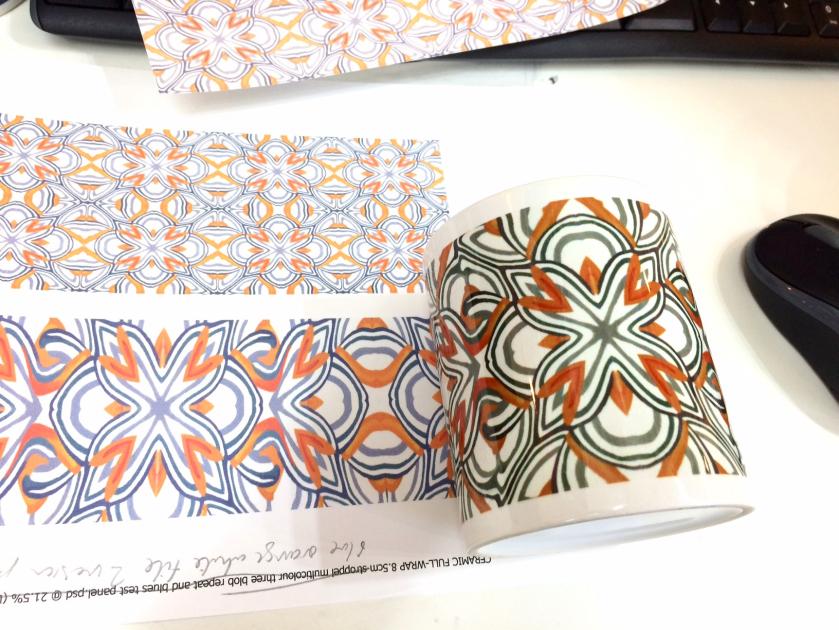
Hi folks - relative newbie - just wondering if anyone could shed any experienced light on this, as it's driving me nuts! See images.
Colours are mostly OK, but blues turn green or greeny grey. Happens with bone china and ceramic.
I'm waiting on a custom ICC profile from Paul, so currently using the Epson profile which seems to be the best / most accurate (apart from this issue).
BUT I'm wondering whether it's my time or temperature?
I'm using
- a pre-heated halogen oven,
-200 degrees C,
- silicone mug wraps
-11 minutes for 2x11oz mugs
- taking out and leaving wraps on while using a fan to cool.
Oh, and my inks are Fotorite from CityInkExpress, paper from same, all via a (currently well behaved) Epson WF7110.
Thanks in advance for any pointers...
Ruth
Re: Blues turning green - colour change issue...
Posted: 03 Apr 2017, 14:51
by socialgiraffe
Your images point to the ICC profile. I suggest you wait until you have this installed and then try again.
What the image looks like on the dye sub paper will have no relation to what the actual printed colour will look like.
Re: Blues turning green - colour change issue...
Posted: 03 Apr 2017, 15:34
by RuthWinchester
Thank you, that's reassuring... I have been experimenting with times etc, but don't want to ruin more than I have to!
I realised after I'd posted the orange / grey image that the offending mug is actually shown alongside a "normal" print - ie not subli ink or paper.
Bizarrely, tho, the subli inks are fairly true to the normal inket before they are sublimated (a bit washed out looking but otherwise similar) hence me wondering whether it was something I was doing wrong in the heating process.
Will wait (not very patiently...) for Paul to do my profile.
Re: Blues turning green - colour change issue...
Posted: 03 Apr 2017, 18:22
by gorgall2
When you are experimenting, just use part of the design, then you can use one mug for several tests. Less wastage.
Re: Blues turning green - colour change issue...
Posted: 14 Apr 2017, 01:49
by jhart
Hi Ruth - What software are you using for your design and printing?
I had a very similar problem with Serif's DrawPlus even though I followed CityInkExpress's instructions for printing with Draw Plus. I tried all sorts of adjustments to get things right, without success. Then I tried using PhotoShop Elements with the appropriate CityInkExpress's instructions.... and the problems disappeared! Same profiles with both software. DrawPlus printed wrong and PhotoShop printed right.
(I'm using PhotoShop Elements 15 - recently upgraded to it from version 10 that I'd been using for years. The DrawPlus version was X5.)