Page 1 of 1
Re: Wasatch RIP - Importing Custom profiles HPZ 2100
Posted: 24 Jan 2017, 18:19
by Justin
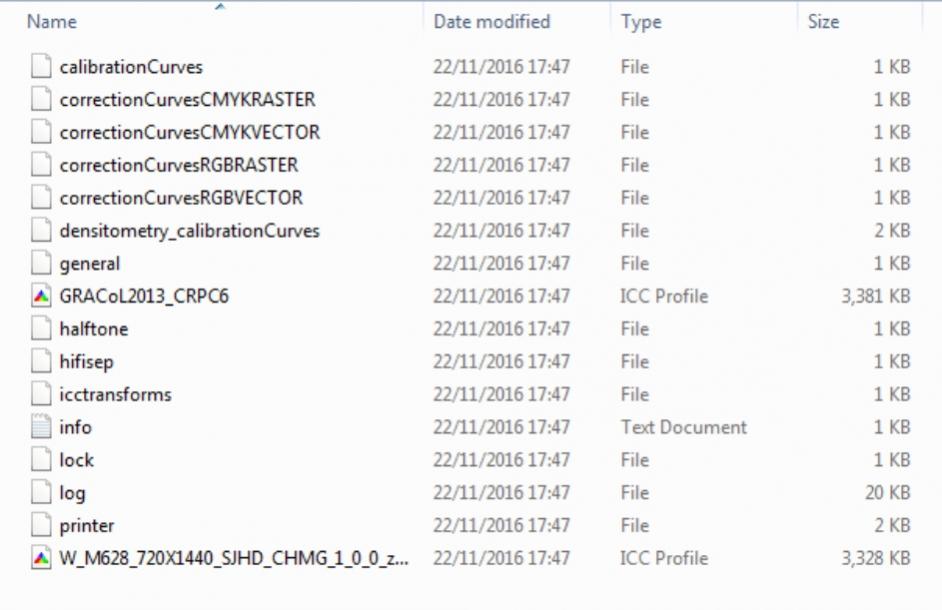
Anyone using Wasatch RIP? I print sublimation through this and have also now setup my HP Z2100 to do the same. Issue I'm having is getting the custom made profiles into Wasatch. I have the ICC profile file but it looks like I need other files to go with this so that Wasatch can see the profile?
Anyone any ideas please?
Re: Wasatch RIP - Importing Custom profiles HPZ 2100
Posted: 27 Jan 2017, 21:04
by Justin
Anyone any ideas? Pic below of a typical set of files in the RIP......
- vB_ID:4442
- Screenshot 2017-01-27 21.01.jpg (52.7 KiB) Viewed 2194 times
Re: Wasatch RIP - Importing Custom profiles HPZ 2100
Posted: 28 Jan 2017, 10:06
by daviddeer
Wasatch needs a complete calibration profile (including linearisation of the printer) set for the icc to work.
If you can do this yourself
here are the instructions to create your own. However you need to print the chart onto a suitable substrate such as aluminium sub sheet and use the spectrophotometer on that to scan the output. I believe that wasatch produces cmyk charts so you need a spectro that will create cmyk profiles.
Some companies supply the whole calibration as a zip file you unpack into your rip folder. Just having the icc won't really help.
If you want to use the supplied icc you may have to print directly to the printer and bypass the rip.
Re: Wasatch RIP - Importing Custom profiles HPZ 2100
Posted: 28 Jan 2017, 10:32
by Justin
Thanks for that, Uss, the Subli profiles were zip files so contained everything. I'm getting good results printing direct but thought I'd have a go through the RIP just to see how it worked, nesting etc is very useful.
Re: Wasatch RIP - Importing Custom profiles HPZ 2100
Posted: 09 Feb 2017, 19:57
by daviddeer
don't know if this pdf will help
Re: Wasatch RIP - Importing Custom profiles HPZ 2100
Posted: 09 Feb 2017, 20:05
by Justin
Cheers, I'll take a look
