Page 1 of 1
Re: I am impressed!
Posted: 03 Jul 2015, 17:28
by KathG
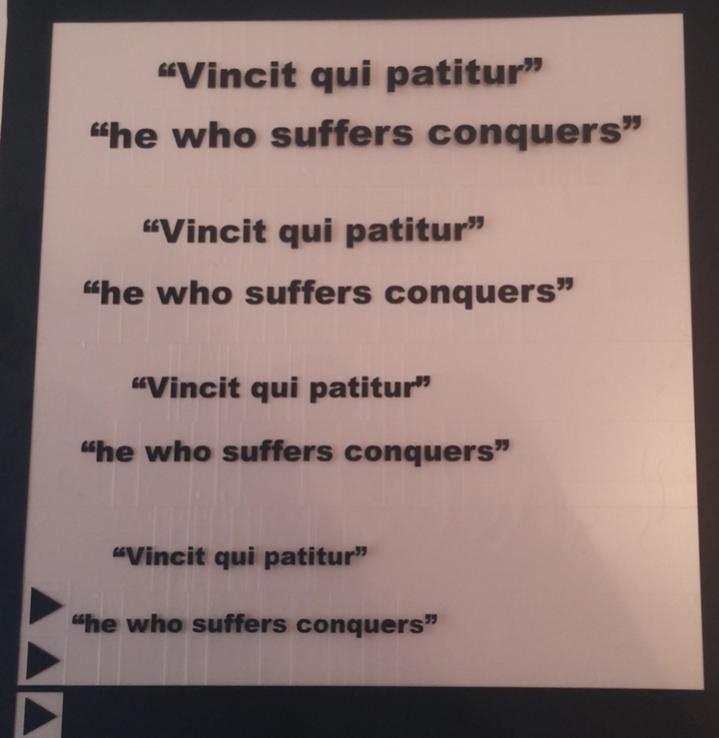
I bought a Graphtec CE6000-40 this week and got round to testing how small I could cut letter. Well I'm am impressed, though Im sure most of you already new it could cut this small

.
I had been trying last week to use my Cameo to cut small letters and it just was not having it, inverted comers and dots just lifted of the backing.
Anyways here is an image of my test this afternoon. Fonts cut in from top down 8mm, 7mm, 6mm, and lastly 5mm. Not one dot or letter lifted from the backing while weeding.
HTV used is TMT 123 Premium Flex.
Cheers
Kath
PS I still managed to make a mistake I forgot to mirror. Good job it was a test.
- vB_ID:3585
- Letter-size_test copy.jpg (37.62 KiB) Viewed 294 times
Re: I am impressed!
Posted: 03 Jul 2015, 17:37
by Developit
Looks good. Oh so much to learn.
Re: I am impressed!
Posted: 03 Jul 2015, 18:11
by Quinsfan
I have the word "Mirror?" above my cutter as I also do vinyl lettering for my signage side of the business, so need to keep checking.
Re: I am impressed!
Posted: 03 Jul 2015, 18:46
by Developit
I'm going to put a big Mirror sign on my PC and above my printer tomorrow
Re: I am impressed!
Posted: 13 Jul 2015, 20:26
by Gygafo
KathG;102711 wrote: PS I still managed to make a mistake I forgot to mirror. Good job it was a test.
Lol! I bet we have all done that at one time or another Kath.
Re: I am impressed!
Posted: 15 Jul 2015, 08:59
by mrs maggot
my cutter is set to mirror automatically, as i cut more garment stuff than signs, so when i make a sign up i mirror it in the programme, so when i import it to the cutter the mirror sets it the right way round if that makes sense, i also have all my cut depth settings on my cutter with the words "what are we cutting" to remind me to check cutter depth
Re: I am impressed!
Posted: 15 Jul 2015, 09:23
by Gygafo
mrs maggot;103009 wrote:my cutter is set to mirror automatically, as i cut more garment stuff than signs, so when i make a sign up i mirror it in the programme, so when i import it to the cutter the mirror sets it the right way round if that makes sense, i also have all my cut depth settings on my cutter with the words "what are we cutting" to remind me to check cutter depth
Hi Mrs M, I only cut for garments but since I got my new Roland I'm cutting directly from Corel Draw and for some reason it's just become second nature to mirror. I used to mess up quite allot when I was using the Silhouette though!
Cheers!
Nigel.
Re: I am impressed!
Posted: 15 Jul 2015, 09:42
by KathG
Like that idea Mrs M re keep cut setting on the machine. Luckily though I have not had to change my blade cutter depth yet on my Graphtec 6000-40.
One thing I am loving about the Graphtec, you can make cutting presets for different media, plus I love the app that lets you change all the settings on the computer.
Cheers
Kath
 .
.