Page 1 of 1
Re: Removing white background from image
Posted: 18 May 2015, 23:08
by Justin
Anyone help me please, urgently need to remove the white background from an image. Is there a quick way to do this?
Re: Removing white background from image
Posted: 18 May 2015, 23:34
by Paul
it is

open your image.
make sure padlock on layer is off (hold alt and double click on it)
now go to select>colour range
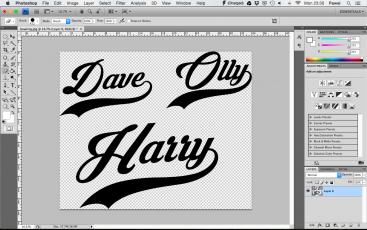
- vB_ID:3475
- Screen Shot 2015-05-18 at 23.30.45.jpg (20.28 KiB) Viewed 8 times
when window appear click on white background
- vB_ID:3475
- Screen Shot 2015-05-18 at 23.30.45.jpg (20.28 KiB) Viewed 8 times
now click delate and is done
- vB_ID:3475
- Screen Shot 2015-05-18 at 23.30.45.jpg (20.28 KiB) Viewed 8 times
Re: Removing white background from image
Posted: 18 May 2015, 23:40
by Justin
Many thanks Paul, hadn't realised it was this easy! Cheers.
Re: Removing white background from image
Posted: 19 May 2015, 07:52
by Paul
It is for solid colors and not to many details
Re: Removing white background from image
Posted: 19 May 2015, 08:42
by KathG
Thanks also from me Paul, I always manage in my own way to get there, but now I know an easier way.
Kath